Protecting a network from today's cyber threats is an important and daunting task. There are dozens and dozens of tools to help security managers secure the enterprise. But it should not be forgotten that Web security begins with the Web browser, the basic tool that makes Web surfing possible. The way a browser is set up to communicate with the Web is the place to start to implement a lock-down security policy.
The browser market
During 2015, Google Chrome was dominantly the most popular browser with around 65% of the Web traffic. The closest browser in terms of Web traffic was Firefox which had 21% of the Web traffic in 2015. Internet Explorer had around 7.2% of the Web traffic and Safari averaged 3% of the Web traffic.
Most vulnerable browsers
Based on vulnerabilities identified in last few years, Firefox is the most vulnerable Web browser out of the four major browsers (Google Chrome, Internet Explorer, Firefox and Safari). Google Chrome had the second most vulnerabilities identified in this time, Internet Explorer had the second lowest amount of vulnerabilities, with Safari having the least amount of identified vulnerabilities in this time period.
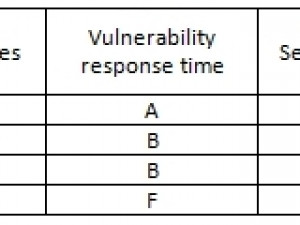
However, this does not tell the whole story as it's important to consider the amount of time it takes for each browser to create a patch for their security vulnerabilities because that information allows you to know how long each browser will be vulnerable to security threats that are identified. Google Chrome has the fastest response time to browser vulnerabilities with an average patch release date of 15 days from the time the vulnerability is identified. Mozilla Firefox is the second fastest with 28 days and Internet Explorer is in third with 30 days taken to create and install a patch to fix security vulnerabilities. Safari is last in terms of the time it takes them to fix security issues with a patch, it takes them 54 days to complete.
To summarise, while Safari has the least amount of vulnerabilities, it takes the most time to fix these issues, almost double the amount of time Firefox and Internet Explorer take and over three times as long as Google Chrome. Google Chrome has the second most security vulnerabilities but has the fastest turn-around time for fixing these issues.
Security profile rankings
These rankings were determined by evaluating four different security areas of the major four internet browsers. These four security areas are vulnerability, vulnerability response, available security plug-ins and average Web traffic.
The reason why these four areas were chosen is when all four are combined together they give you the most reliable security profile for each of these browsers. Using only one or not using all four in unison can lead to a less reliable security profile for these browsers.
Vulnerability measures how exposed a browser is to security issues and uses the number of security issues each browser is exposed to as a metric for determining how secure a browser is from outside security threats.
Vulnerability Response is the length of time it takes for a browser to provide a security patch for an existing security issue. This is used to determine how long a browser is vulnerable to existing security threats.
Available Security Plugins are used to strengthen the overall security of your browser and lower the risk of exposure to security threats. They allow the user of the browser to customise their security and privacy in their browser.
Average Web Traffic is the measurement of the average number of users for each browser. This is used to determine how well security is handled in relation to the amount of traffic that a browser is receiving on a regular basis.
* Google Chrome
Recommended Security Plug-ins: LongURL.org, Web of Trust, Don't track me and Disconnect, Webutation and HTTPS Everywhere.
Set-up browser alerts, update regularly, make updates automatic, use smart-lock for passwords, Leave the default settings for phishing, malware and pop-ups as they are. Google Chrome also allows you to turn off the allowance of Java-script on the Web sites you visit.
* Firefox
Recommended Security Plug-ins: LongURL.org, Web of Trust, Don't track me and Disconnect, Webutation, HTTPS Everywhere and the NoScript Security Suite.
Set-up browser alerts, update regularly, make updates automatic. Leave the default settings for pop-ups, unsecure Web sites, phishing and malware as they are.
* Internet Explorer
Recommended Security Plug-ins: LongURL.org, Web of Trust, Don't track me and Disconnect.
Set-up browser alerts, update regularly, make updates automatic, leave the default settings for pop-ups, unsecure Web sites, phishing and malware as they are.
* Safari
Recommended Security Plug-ins: LongURL.org, Web of Trust, Don't track me and Disconnect.
Set-up browser alerts, update regularly, make updates automatic, leave Safari's default settings for dangerous or unsecure Web sites, pop-ups, phishing and malware as they are.
Share


iSheriff
iSheriff is a leading cloud-based provider of Enterprise Device Protection to thousands of organizations worldwide. The company's global cloud network, award-winning security, and SAAS delivery model, provides a single security platform to effectively protect the enterprise. iSheriff has been recognised by leading analysts and industry publications, including SC Magazine, Network Computing, and IDC. Virus Bulletin's VB 100 independent comparative testing named iSheriff the most effective solution against new and emerging malware.
Editorial contacts