This is going to be a problem.
We have always been told that anyone can steal our information when we hook up to a WiFi hotspot, and since the Ruckus Network wireless challenge has restricted my Internet connectivity to only WiFi hotspots, I realised I was in big trouble.
What I have come to appreciate is just how safe and secure using the cellular network for Internet access actually is. While it is not impossible for someone to hack your Internet session while on 3G, they really need to have specialised skills and expensive equipment to do so. Not something the average hacker will be doing.
However, using WiFi hotspots, on the other hand, is completely different.
I decided to test the theory that "anyone" can steal your info from a hotspot, and I was horrified at what I discovered!
Being vulnerable
I connected a laptop to a free open hotspot and did the unthinkable - I disabled my Windows Firewall. In the time that it took to order my coffee, somewhere on the network an attack began. I calmly looked around the room and instinctively knew who it was by the sheer delight on one teenager's face as he buried deeper into his laptop and began to run a Port Scanner against my computer. This software looks for open ports (network services) that can be attacked, and possibly exploited.
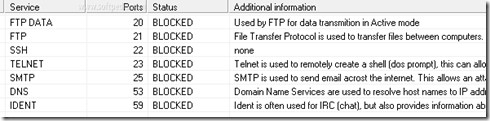
This all happened within minutes, and if I had let it carry on, I would have been compromised. I immediately disconnected from the network, enabled the Windows Firewall, and I connected again. As I hit the connect button, I made eye contact with the same kid, who was clearly irritated that he could no longer play his hacking script games. Sorry mate.
It was time to cross over to the dark side. Okay, the grey side. I became the hacker to see how simple it is for anyone to steal info from WiFi networks.
The fake ISP trick
I set up some software (a rogue wireless access point) on my computer that I downloaded off the Internet at a total cost of $40. This software is a basic Internet hotspot that starts to broadcast a WiFi network, seemingly allowing anyone Internet access for free. I called my hotspot: Hotel Guest Free Internet.
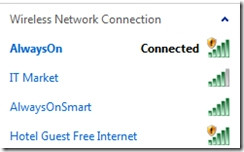
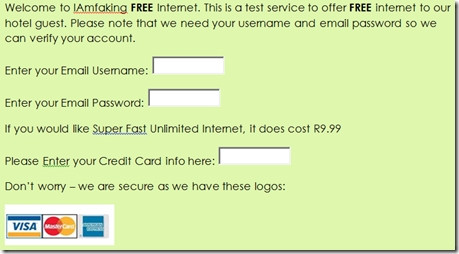
I then created a login page that asked the person connecting for their e-mail address and their e-mail password, "so I can verify their account". I also got cheeky and offered a "Super Fast Unlimited Internet" at only R9.99".
The login page that asked for this information was as simple as could be. Here is that landing page that people saw when they connected to my fake hotspot.
Surely no one would fall for this...
Wrong.
I started to broadcast my hotspot at 10:48am. By 10:53am, I had four people trying to connect.
Ed Note: Obviously I didn't save/view their username and password as this was only a test, but if I was a malicious hacker, I would have had full access to their e-mail and credit card info. I assume that most people use the same username and password across all their sites, including e-mail, Facebook, etc, and so those would have been vulnerable too.
So why did my fake Internet hotspot work?
There are several reason that this type of hack works:
1. We all like to get something for free. So when I advertised my WiFi network as FREE and wrote it in BOLD, no one bothered to read the name of the service provider, being I Am Faking. The people connecting were fixated on the free.
2. The request to verify the e-mail address seems reasonable and a small price to pay for free Internet.
3. I asked for credit card details. I even wrote that "we are secure as we have these logos", which is obviously rubbish, and yet someone entered their credit card number.
Man in the middle
Port scan and fake hotspots are simple and software tools are available for anyone to use to test their own networks. However, when you step it up a notch, there are even more sophisticated attacks that steal the information between your computer and the hotspot. This software reads everything that your computer sends, including username and passwords, and even voice calls that you make to your loved one using VOIP applications.
What is particularly dangerous about this kind of attack is that you don't even know that it is happening. Everything just works and so you are not even aware that something is not right.
Surely you need to be a super-techie to launch this kind of attack? Yes and no. I found this software freely available on the Net, and with some technical know-how, managed to set it up. When I got stuck, I simply followed an instructional video clip and I was able to execute a passive attack to grab information from the WiFi network, as people around me were logging onto their mails!
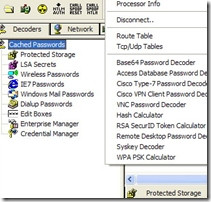
This was surprisingly easy to do. In my opinion, too easy!
How do you protect yourself when using an Internet hotspot?
Before you run for the hills and make an aluminium-foil helmet, hotspots themselves are not the problem. When you look at how AlwaysOn is set up and run, you can see a trustworthy organisation. Nico Pretorius, CEO of AlwaysOn, clearly makes security his top priority and confirms that the company's access points around the country are set up in such a way that they "do client isolation on our APs, which ensures users' traffic is isolated". In other words, two people can join the same hotspot, but their information will never be seen by each other.
As mobile users, here are some tips to keep safe when using hotspots:
Only connect to hotspot that you recognise. Ask your waiter/waitress if the establishment has a WiFi, and if so, what is the name and the password. (As a side note: some places have hotspots for customers to use, but I noticed that the waiters pretend they don't or that the "Internet is down". One waiter said they do it because they want to have the bandwidth for themselves to download their movies!)
Don't stay permanently logged into accounts. If you are checking your mail, log in, check the mail, and log off. Being constantly logged on gives potential hackers more time to try capture that sensitive information.
One that I always advise: do not use the same password on different Web sites. If someone gets your password, they have access to every other site and service you log into.
Have an up-to-date anti-virus and security software on your computer. These will alert you if you are visiting sites that have been reported as suspicious.
If you travel out of the office on a regular basis, ask your company to set up a virtual private network. These systems encrypt the data between your computer and the Internet and the company network.
Finally, remember to listen to your gut. If you don't think something is right - disconnect immediately.
Be careful out there.
Share

