
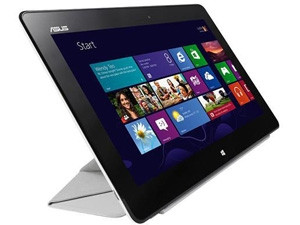
The Asus VivoTab Smart is an entry-level Windows tablet, taking its place in a distinguished line-up of Asus tablets. It's not packed with features, but focuses on the basics, which it gets broadly right, especially given its price.
Look and feel
From a build-quality perspective, I have only good things to say about the VivoTab. It boasts clean lines and a slightly rough back surface, which makes for comfortable holding. It packs a 10.1-inch IPS screen into a slightly chunky (9.7mm thick) casing, weighing 580g. It might not win any prizes for thinness or weight, but it's perfectly comfortable to use. Asus consistently impresses with its tablets' ergonomics, and this is no exception.
Hardware is up to snuff...
The VivoTab runs a 1.8GHz Intel Atom processor, with 2GB of RAM, which combines to be powerful enough not to struggle too much with everyday tasks, though, open more than a couple of apps and you'll start seeing lag. (In PC terms, it scores 3.2 on the Microsoft Experience Index).
It boasts 64GB of storage, but like other tablets, the actual storage capacity is unrelated to the advertised size. The device may be running a 64GB MMC card inside, but 50GB is formatted for you to use (the rest is recovery and hibernate partitions, I assume), and only 31GB of that is actually free. This isn't Asus' fault, but I'd really like manufacturers to advertise available storage space by default. You can expand the storage via the microSD slot (no full-size SD slot, unfortunately).
There's HDMI out for an external screen, and charging is via a micro USB port (a welcome change from Asus' proprietary connector in other tablets).
Front and back cameras are included, and while entry-level tablets can get away with skimping on cameras, I'm glad Asus didn't - a Windows tablet is going to be Skyping, and without a decent front-facing camera, that would be a problem.
The screen is on par with other devices in its class, which is to say pretty good, but not exceptional. It's only 1 366 x 768, so well below the 1 920 x 1 080 of top Android tabs or the 2 048 x 1 536 of the iPad's Retina display, but still crisp and clear, and the colours are great. The screen battles in sunlight more than you might expect - this is really an indoor tablet - but other than that, I have no complaints.
Audio, on the other hand, definitely is lacking. The built-in speakers aren't great, and being located on the underside of the tablet, they're even more muted when it's resting on a flat surface. You'll want to use headphones or an external speaker for enjoying movies.
...but software is a problem
So the hardware is decent; what about the software? That's where things get a bit sticky.
In summary
Pros: Solidly built, well priced in context
Cons: Performance isn't great, no USB, Windows 8
Overall: As a starter Windows 8 tablet, it shows potential, but hold out for the version with Office and Windows 8.1.
Operating system: Windows 8
Display: 10.1-inch IPS panel, 1 366 x 768
CPU: Intel Atom Z2760 dual-core
Memory: 2G
Storage: 64GB
Connectivity: WiFi 802.11 b/g/n, Bluetooth 4.0, NFC
Camera: 8MP (rear), 2MP (front)
Battery: 25Wh Li-polymer, rated to 9.5 hours
Dimensions: 262.5 x 171 x 9.7mm
Weight: 580g
Rating: 4/10
Price: R6 999
The VivoTab runs Windows 8, and much has been written about the ups and downs of Microsoft's journey into the tablet world. This is a review of the tablet, not the OS, but I do have to note that, although Windows is actually very promising on mobile devices, it is frankly still quite buggy. I experienced frequent software failures, networking glitches and interface frustrations - 8.1, the promised upgrade, is around the corner, and it's hard to recommend buying a tablet running Windows 8 before that upgrade arrives.
Still on the software side, it was disappointing to find that the VivoTab doesn't come with Microsoft Office preinstalled. There is a model that does include Office, but it's not available locally yet (pro tip: Amazon has it). Even odder is that you can install a trial version of Office, but the system doesn't have the installer preloaded. It's a big, slow download, and it really would have made the experience better to have it preloaded, if not just fully preinstalled. The good news is that LibreOffice works just fine on the tab, so unless you're dependent on Microsoft Office, there are other options. If you are, then you may need to factor the cost of that software licence into the tablet's price.
In short, while I was happy with the tablet's hardware, I can't say the same for the software. Overall, it was disappointing, but worth watching - improvements are imminent, and I'm looking forward to seeing that in action.
Something's missing
While we're buying add-ons, it's time to note that, as a functioning PC, you'll get the most out of any Windows tablet if you have an external mouse and keyboard. Ideally, a clamshell lid-cum-keyboard, and Asus will sell you one for R900. Of course, using a keyboard means propping the screen up, so you want a stand too. Asus offers a nifty folding cover (which doubles as an adjustable stand) for R680. These are great options, but it does strike us that, once you've bought the keyboard and the stand as well as that Office licence, you're closing in on R10 000 and could have just bought a good ultrabook instead. If you wanted portable computing, that's a better option, but it does miss the point - this is a tablet at heart, and as an entry-level tablet with Windows potential, it's still pretty reasonable, all things considered.
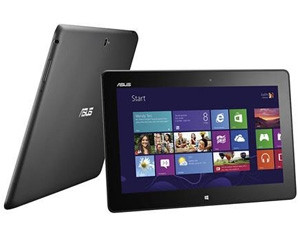
Aside from the software issues, the lack of ports was also a frustration. I'd very much like an SD card slot, but above all, a USB port should be considered essential - the OS fully supports peripherals like external keyboards and mice, and could use a flash disk or external drive, but the lack of USB support means the device falls well short of delivering its potential. And since the available keyboard is Bluetooth connected, rather than a dock like Asus' Transformer range, it can't offer extra ports either.
In a nutshell
For the money, if the software really delivered on its potential, I could recommend the VivoTab. But it's only just cheaper than an iPad or a well-specced Android tablet, and right now, the software just doesn't step up well enough to compete with those. The flaws aren't Asus' fault, but until the Windows 8 ecosystem is firing on all cylinders, I'd have to suggest alternatives for the time being. What really drives that comparison home is just how good the Asus Android tablet range is by comparison.
Share

