
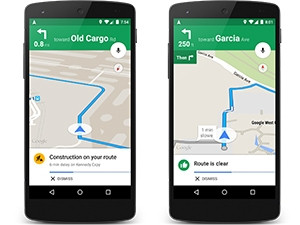
A new Google Maps update hopes to help users avoid traffic. When a destination is added to the app, users will receive a spoken alert about upcoming traffic conditions to help identify the quickest route.
"While you're on the road, Google Maps will give you a heads-up if congestion lies ahead, and how long you'll be stuck in a jam. You'll also get the option to take alternative routes, including explanations for why one is recommended - whether it's the fastest or just avoids traffic," the company said in a statement.
The alerts will be available to both Android and iOS users with the latest version of Google Maps installed.
In 2012, Google introduced live traffic coverage to SA. The traffic overlay on Google Maps showed current traffic conditions (with a colour-coded system that rates roads on a scale from fast to slow), and also provides estimated travel times based on traffic conditions.
The service used crowd-sourcing technology and analyses data from GPS-enabled phones that have the Google Maps application installed. The anonymous data collected by Google includes the current speed at which the device is moving.
Anyone can now view the current traffic flow in the covered areas by clicking on the "Traffic" widget in Google Maps online, or by selecting the "View Traffic" option in the mobile application.
The new traffic alerts will be read out aloud to the drivers, so they can keep their eyes on the road.
Making time
The tech giant has also added a new feature to its Google Calendar app, which allows for users to schedule in 'smart' personal goals.
The feature, called Goals, works by finding time within your existing schedule to work on a personal goal, and moving it to a later time or date if something last-minute comes up.
Once a goal is picked, like 'run three times a week' or 'read more', Google will look at your calendar and find the best windows to pencil in time for that goal. The app will automatically reschedule if you add another event that's in direct conflict with a goal.
Users also have the option to defer goals to another time.
The app will become more intelligent at scheduling time for goals the more it is used.
The feature will be available on Android and iOS and will roll-out over the next few weeks.
Share

